




The Milesight WS101 is a radio button that reports over LoRaWAN that someone has pressed it — as an emergency call, as an acknowledgement, or as the trigger for an automation. Because it runs over LoRaWAN it needs no WiFi, no wiring and no socket: stick it on or screw it down once, and it transmits for years from inside the building to the gateway. Short, long and double presses can be evaluated separately; LED and buzzer confirm every action right at the device. Setup takes seconds via NFC with a smartphone. A device for care facilities, lone working positions, and anywhere a person has to be able to call for help quickly and without searching.
- up to 9.5 yearsbattery life
- 3 press patternsshort, long, double
- 50 × 50 × 18 mmsize, 38.8 g
- −137 dBmreceive sensitivity
What sets the WS101 apart when it matters
- Immediate feedback at the device: LED and buzzer confirm the press. That sounds incidental, but it is the most important difference to a silent button: anyone pressing in an emergency has to know the signal went out — not wonder whether anything happened at all.
- Three distinguishable press patterns: short, long and double can be assigned separately. That lets you separate a genuine emergency call from an accidental touch, or put a second function on the same button — “help” on a long press and “all is well” on a double press, say.
- Direct device-to-device communication: via Milesight’s own D2D protocol the button talks straight to another Milesight device — a siren or a relay in the next room — without going through gateway and server. That reacts faster and still works when the internet connection is down.
- Setup via NFC: hold the smartphone to the button, set the options in the manufacturer’s app, done. For fifty devices in a care home that saves a whole working day compared with configuring over cable or downlink.
- Battery lasts longer than most projects: at ten presses a day and with a good radio link the manufacturer reckons on around nine and a half years. The cell is included and replaceable.
- Mounting to suit the situation: screwed down for a fixed place at the bed or on the wall, stuck on for quick retrofitting, or on a lanyard around the neck as a portable button.
- Network independent: Class A device for 868 MHz with OTAA and ABP. It runs on any LoRaWAN network — The Things Network, Swisscom LPN, ChirpStack or your own server.
Typical uses
- Emergency calls in care: mounted at the bed, in the bathroom lobby or by the armchair. The alarm lands directly in the care system without a call installation having to be wired — often the only practical route in older buildings.
- Lone working positions: workshop, warehouse, plant room, large site. Anyone working alone has a button within reach, even where there is no mobile coverage.
- Reception and till: silent alarm under threat, mounted discreetly under the counter.
- Schools and nurseries: raising the alarm from the classroom without anyone having to get to a phone.
- Service and maintenance messages: “material empty”, “cleaning needed”, “fault” — a button on the machine or in the washroom reports the need instead of someone making a call.
- Building automation: trigger scenes, switch lights, release doors — anywhere a cable to a switch would be too much effort.
- Larger rollouts: because configuration runs over NFC and the devices are identical, the installation scales from one room to a whole building without the effort per device going up.
That settles the selection. What follows is the depth for planning and operation.
Judging range correctly
Manufacturer range figures refer to line of sight — for a device hanging on an interior wall they say little. What counts is how many walls and floors lie between button and gateway. In a typical solid building one or two storeys or several partition walls are no problem, whereas reinforced concrete and lift shafts attenuate heavily. The high receive sensitivity of −137 dBm recovers a lot, but it does not replace sensible gateway placement. Practical advice: before you mount fifty devices, test at the least favourable point in the building — usually a basement room or a corner on the top floor — whether the signal arrives. If it works there, it works everywhere.
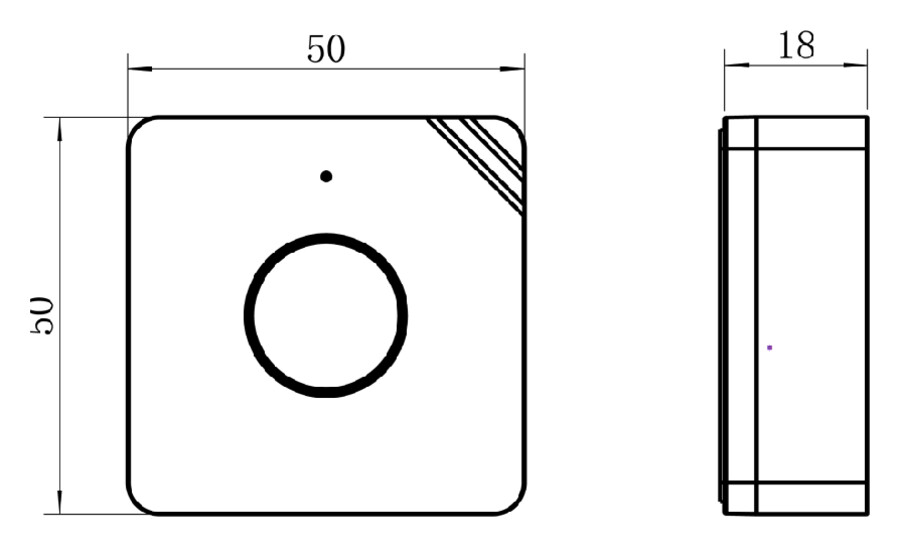
Dimensions in millimetres. The button is a good five centimetres square and stands less than two centimetres proud — small enough for the bedside table, large enough to hit without aiming when it matters.
Battery and maintenance
Inside the device is a lithium thionyl chloride cell in the ER14335 format, colloquially 2/3 AA. It is included and replaceable, but it is not a DIY-store item — on an installation with many devices it is worth keeping a few spare cells in stock. The button reports a low battery via the LED and in the data telegram, so the change can be planned. Because battery life depends heavily on how often it is pressed and how good the radio link is, the manufacturer’s figure of around nine and a half years applies to ten presses a day over a short radio path; with a poor link or frequent use it is considerably shorter.
Technical data
The general product data – protection rating, battery, dimensions, housing, origin – is in the detail table further down this page.
| Operation and feedback | |
|---|---|
| Triggering | short, long and double press, separately configurable |
| Feedback at the device | LED and buzzer for press confirmation, network status and low battery |
| Configuration | NFC via smartphone app, alternatively by downlink |
| Radio | |
| Radio technology | LoRaWAN Class A, OTAA and ABP |
| Direct operation | Milesight D2D for device-to-device control without a gateway |
| Receive sensitivity | −137 dBm |
| Range | up to 15 km line of sight; indoors governed by walls and floors |
| Antenna | internal |
| Operation | |
| Battery life | up to 9.5 years at 10 presses per day over a short radio path |
| Weight | 38.8 g including battery |
| Mounting | screws, adhesive tape or lanyard |
| Compliance | CE, FCC, RoHS |
Help with planning
The datasheet and instructions are under the Documents tab at the top of this page. Planning an installation with several devices and unsure about gateway coverage, alarm forwarding or connecting to an existing care system? Talk to us — we have supported installations like this before. For sizing, pre-configuration and commissioning we will gladly put together a quote.
Recensioni
Ancora non ci sono recensioni.