







The Elsys EMS2 Desk answers a question almost every organisation now asks: how many workstations are actually used? The sensor is stuck under the desktop and reports whether someone is sitting at the place — together with the temperature and humidity at that workstation. Guesses about utilisation become measurements, and “we need more space” becomes a statement you can back up. It is flat, white, catches nobody’s eye, runs for several years on one battery, and is set up by holding a smartphone to it over NFC rather than being wired in.
- 3 valuesoccupancy, temperature, humidity
- up to 10 yearson one battery
- 50 cm · 60°detection area
- NFCconfiguration by phone
What sets the EMS2 Desk apart
- It measures the workstation, not the room: a room sensor says “someone is here”. This one says which place is taken. For desk sharing and space planning that is the decisive difference — the occupancy rate of an open-plan floor says nothing about whether 20 or 60 desks are really needed.
- Invisibly mounted: under the desktop nobody sees it and nobody knocks it. No cables, no work on the furniture, no tradesman.
- Configuration without tools: all Elsys sensors are set via NFC — hold an Android phone to the housing, set transmit interval, keys and triggers, done. With fifty desks that is the difference between an afternoon and a week.
- Indoor climate included: temperature and humidity come without an extra device. For the discussion about working conditions that is often more valuable than the occupancy itself.
- Built to last: a single lithium cell lasts up to ten years depending on transmit rate and environment. With a fleet of a hundred sensors that determines the maintenance effort.
- Demonstrably certified: LoRa Alliance Certified and Swisscom IoT Qualified, manufactured in Sweden — both count when the project has to go through a tender.
Where it is used
- Desk sharing and flexible office: the main case — proving how many workstations are really needed before rebuilding or giving up space.
- Space optimisation in property: rented floor space is the second largest cost block after staff. Measured data is hard cash here.
- Cleaning on demand: clean only what has been used instead of walking empty zones to a schedule.
- Booking systems: as feedback on whether a reserved place is actually occupied — against ghost bookings in the calendar.
- Evidence of workplace climate: documenting temperature and humidity where they are disputed.
- Laboratory and workshop places: anywhere the use of individual places matters rather than that of the room.
That settles the selection. What follows is the depth for planning.
Where the sensor belongs
The manufacturer is unusually specific here, and it is worth following exactly: the sensor is stuck under the desktop, 10 to 20 centimetres from the front edge, and the opening in the housing must face the person sitting or standing there.
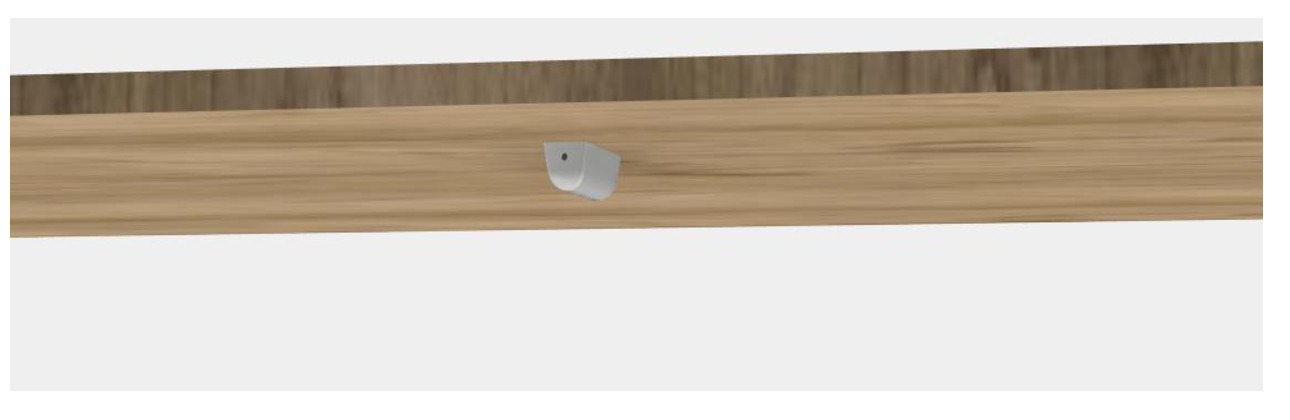
It detects up to 50 centimetres, with a 60 degree opening angle — horizontally as well as vertically. From that follows the most important mounting rule: mounted too far back it sees nobody; too far forward it also sees passers-by. The band from ten to twenty centimetres is the window where both hold.
After mounting it needs one night. The sensor calibrates itself to its surroundings and sets the zero point for occupancy detection in the process. Anyone evaluating the first data right after sticking it on is measuring the calibration, not the occupancy. Equally important: it must not look at a heat source and must not sit next to an air outlet — both permanently distort the detection.
What “occupancy” actually means
The sensor detects presence via thermal radiation, aimed at the upper body. From that follows what it does well and what it does not: a person sitting at the place is reliably detected. A jacket over the chair back or a bag on the desk, by contrast, is not — which is an advantage, because it is exactly those placeholders that distort any occupancy statistic based on bookings.
The flip side: if someone sits very still and outside the 60 degree cone, a brief gap can occur. That is why one does not work with snapshots but with a hold time — the place still counts as occupied for a few minutes after the last detected movement. For an evaluation over a day or a week that makes no difference; for a “free now” display at the entrance the hold time should be chosen deliberately.
On battery life: the ten years apply to a calm transmit rate. Anyone transmitting every two minutes will reach the battery change considerably sooner. For occupancy data an interval of ten minutes plus an event on state change is generally enough — that gives you both the curve and the moment without burning through the battery.
Technical data
The general product data – dimensions, housing, protection rating, battery format, origin – is in the detail table further down this page.
| Measured values | occupancy, temperature, humidity |
| Occupancy detection | infrared aimed at the upper body, up to 50 cm, 60° opening angle horizontal and vertical |
| Temperature | 0 … 50 °C, resolution 0.1 °C, accuracy ± 0.2 °C |
| Humidity | 0 … 85 % RH, accuracy ± 2 % at 25 °C |
| Radio | LoRaWAN 1.0.4, Class A or C (selectable), OTAA and ABP, ADR |
| Transmit power | 14 dBm or 20 dBm depending on region; link budget 137 dBm (SF7) to 151 dBm (SF12) |
| Channel plans | EU863-870 as well as US902-928, AS923, AU915-928, KR920-923, IN865 |
| Encryption | end to end per LoRaWAN (AES-CTR), integrity protection (AES-CMAC) |
| Configuration | NFC with Android app or by downlink: sampling rate, transmit interval, keys, triggers |
| Power supply | 1 × lithium cell 3.6 V, AA format, replaceable — not included |
| Operating life | up to 10 years, depending on configuration and environment |
| Mounting | under the desktop, adhesive, 10 … 20 cm behind the front edge |
| Housing and weight | ABS UL94-V0 white, 21.2 × 74.9 × 20.8 mm, 10 g without battery |
| Area of use | indoors, IP20, 0 … 50 °C, up to 85 % RH non-condensing |
Support with the rollout
Want to know how many sensors your floor needs, how the data gets into your analytics, or whether one gateway covers the whole building? Tell us how many workstations are involved — we will work through the coverage before the first order goes out. For larger rollouts we pre-configure the sensors on request so they can be unpacked and stuck on. For sizing, pre-configuration and commissioning we will gladly put together a quote.
Reviews
There are no reviews yet.